Showing posts with label Readyboost. Show all posts

06 August, 2014

Readyboost: sysmain.com

English: Screenshot of Microsoft's chkdsk.exe ...
English: Screenshot of Microsoft's chkdsk.exe (NT version) in action. (Photo credit: Wikipedia)
06-August-2014


I had to upgrade my old laptop from Windows Vista to Windows 7, as I find that Vista doesn't cut it. It was nice, if you are coming from Windows XP, but after a couple of Vista years, and having experienced Windows 7 at work, I decided to do an upgrade.

So I did.

It was a move I wouldn't regret, as Windows 7 is definitely better. And even more so, that it has Readyboost feature. I know, it is not a replacement for RAM, but as I understand, it is additional cache memory, one that prevents frequent reading from solid-state disc drives, so it helps!

Then came the problem.

As I have bought a new laptop, and one that is running Windows 8.1 OS, I have almost forgotten to do the occasional check and clean-up routines. And my girls aren't saying anything about the old laptop. They just turn it on, use it, and shut down. No word.

When I remembered to do the usual check, I found that Readyboost isn't working. I saw that the thumb drive size of 4.GB is free. I thought maybe Readyboost was just turned off. When I tried to activate it back, I got the error, saying something about 'sysmain.com' problem.

I searched for this on the web, and I found some that suggested running Super Prefetch, or something like that, and when I tried to follow on the instruction, I got lost. And there really was no clear direction, because it tells of doing some other things -- maybe that is how it got fixed -- for them.

A few days of searching and trying, and finally, I gave up on it. I just did the usual chkdsk /f /r thing on all the drives, and yes, I remember running sfc /scannow, which, unfortunately, found some problems, but also reported that it cannot fix the problem. It was supposed to, but the fixer itself ran into some problem that it failed to fix the problems it found. Wow! The doctor is sick...

And as I said, the last thing I did was run chkdsk /f /r on all the disks, which required the checking for some drives to be on restart.

The laptop was restarted, and chkdsk did its thing, and guess what happened? It fixed the Readyboost problem! I just went back to right-clicking the thumb drive and turning on Readyboost, and it did turn back on! How's that? I still don't understand how or why, but one thing I am sure of, Readyboost in my old laptop is back, so it got some speed gain.

If all else fails, why not try chkdsk /f /r? It might just work for you... also.

Till then!


31 October, 2011

File System: NTFS or FAT (or FAT32)?

3 USB Flash Drives stacked.Image via Wikipedia31-October-2011

I have not always been so keen on the difference between NTFS and FAT file system. I mean, we apply and implement them in our work PCs and servers, but at home, who cares?

I should. At least now I know why.

Last Friday, I was downloading some worship video songs, and when done, I converted them to .avi format, so I can copy them to a USB drive and play them on the Philips integrated Hi-Fi system equipped with USB drive.

What I did was simply un-use one of my currently plugged USB drives from being a ReadyBoost device. Then I copied over the converted files, unplugged them from my laptop, and plugged them to the Hi-Fi system.

Sure enough, USB is detected, but there isn't any file shown!

I turned off my Hi-Fi system, turned on again, and selected USB input, and it is the same: no files!

I turned to one of the other USB drives still plugged in to my laptop, un-use it from being a ReadyBoost device, copied over the files, unplugged it, then plugged it to the Hi-Fi, and the result is the same!

I verified by copying over the files to other USB drives that are currently used for watching movies, and there they are, the files are showing immediately once USB input is selected.

Then another one was used to verify, an SD card, and the same result was got: the files are being shown and are able to play; these on the SC card and the USB card.

Then I was wondering, "What's the difference?"

Then I remembered, the USB drives that 'don't work' were used as ReadyBoost devices, which were formatted with NTFS file system, while the other USB drive and the SD card, well, they are formatted using FAT/FAT32 file system.

So naturally, I took one of the USB drives that 'don't work', formatted it using FAT32 file system, copied over the same video files, plugged it to the Hi-Fi system, and sure enough, it works!

In case you encounter the same problem, the solution may be the same: FAT or FAT32 file system for your Hi-Fi System, an NTFS for your ReadyBoost. Hey, that is what makes it go past beyond the 4GB limitation.

Till then!

Enhanced by Zemanta

24 October, 2011

Readyboost more than 4GB?

The 536,870,912 byte (512×2 20 ) capacity of t...Image via Wikipedia
24-Oct-2011, 8.30am:

Today I discovered that Readyboost size can be extended to more than 4GB!

I was actually not expecting this, as much of the articles found on the web sets the limit of Readyboost cache memory size to 4GB, no more than that. But as I have tried today on my laptop (Probook 4430s) and 2 others desktop PCs (GX280 and GX520 models), the size is no longer limited to 4GB.

I plugged in one 8GB thumb drive on the GX280 machine, and dedicated the whole drive to Readyboost, and it was accepted. The amount recognized is about 7584MB (7.47GB).

On the GX520 machine, I put in two: a 4GB drive, and one that is 8GB. The 4GB drive came up with about 3804GB (3.76GB), while the 8GB drive reserved about 7562MB (7.45GB) space.

On my laptop, I employed an 8GB thumb drive, and a 16GB Sd card. Both being dedicated to Readyboost, the 8GB drive gave a 7562MB (7.45GB) available size, while the 16GB SD card came up with about 15196MB (14.9GB) available space.

If what I'm thinking is correct, this is indicating that we no longer need a very huge RAM size. Just the baseline 4GB fitting will do. And if you need to jack that up, then buy one 16GB SD card, plug it in, set it to dedicated Readyboost usage, and you have a very huge cache memory to play with!

Of course, this is all that I am seeing right now, but before 64-bit, or even Windows 7 or Vista, RAM size was limited to 2/3GB, and the 'extra' that you may have physically isn't used! That is no longer the case these days. And while 32-bit memory addressing is causing the limitation of using up to 4GB RAM only, with 64-bit, that is not the case.

And we are no longer talking about RAM being expensive, but between adding RAM and using SD card or thumb drive, I would be avoiding RAM-adding when I already have 4GB, which could mean dismantling the laptop casing or opening the desktop chassis, when I could just simply plug in an alternative thumb drive or SD card. We actually should be talking about which is cheaper and faster to employ, with less hassle and less opportunity for error and mishandling, etc., etc., etc.

So how's that? Where will this Readyboost technology lead us?
Enhanced by Zemanta

18 October, 2011

Domino 6.5 ain't runnin' in Windows 7 (Laptop)

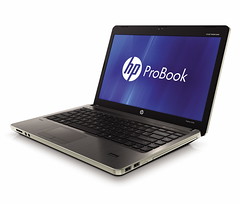
Latitude "Notebook"Image by Annie Mole via FlickrHP ProBook 4430s - Right SilverImage by HP PSG APJ via Flickr
I basically stopped posting articles on my blogs for a variety of reasons.

Sometime in early September, I was issued a laptop, an HP ProBook 4430s, so that they can take away my old desktop - hey, that what I was told!

And I was in the heat of installing and tweaking and customizing things, when after so many tries, I have given up: Domino 6.5 breaks in Windows 7 (laptop).

I know, a couple of weeks earlier to my getting a laptop, I was bragging about making Domino 6.5 work in Windows 7 (Windows 7 and Lotus Domino 6.5) - which is althemore, on an old Dell desktop PC. I didn't knew that it would all be completely different with a laptop. Took me almost a week of doing with the laptop what I did with the desktop to make Domino 6.5 work, but success eluded me everytime.

When I reached the end of my rope, after about 2 weeks, even trying out Domino 8.xx, I told my boss - the laptop I have no use for it, since the major programs I am maintaining is running with Domino 6.5 - which doesn't run.

Basically, Domino 6.5 is "seen" by Visual Studio 2005 and Visual Studio 2010. It can be called in. It can be referenced. But when I run the code, I get "null" errors, indicating that the object has not been instantiated.

Now in our company, we are issued either an HP machine, or a Dell counterpart. Another member of our team also got a laptop, and it was getting ready for deployment (meaning, to be used by the user, whose old desktop will also be taken away...), so my boss made a proposal.

Can I try it out on the other laptop? Maybe it was brand-sensitive, or maybe.... what?

Anyway, I yielded - that is what I was already thinking of doing a week after the unsuccessful tests - and the would-be owner agreed.

I tried, and guess what? The same error I got! So whether it is an HP ProBook 4430s, or a Dell Latitude E5420, if it is running in Windows 7, Domino 6.5 can't run. That's for my case.

As for the old Dell desktop PC, a dying GX280, which I got to reformat and reinstall Windows 7 Enterprise edition, 32-bit OS, I was able to apply the whole fix that I documented weeks back, and Domino 6.5 is able to run. So it's all on the laptops, I suppose... eh?

These are the specs, to be more precise:
Windows 7 Enterprise edition, 32-bit (64-bit ain't the right fit yet, dude!)
> desktops, laptops, they all get the same OS

And the very reason why we can't use 64-bit OS, is that we are still running Oracle 8i systems! And the upgrade isn't a time within reach, my man.

Finally, 64-bit ain't no use, since we only have 4GB RAM in our machines. I just made a good alternative to Windows 7, speeding up my processes by employing Readyboost - 2 pieces of 8GB thumbdrives plugged into my new laptop - now that's something!

The grapes are not so sour after all...

09 September, 2011

Windows 7 and Lotus Domino 6.5

Microsoft Windows 7 Home Premium Upgrade Family Pack (3-User)I am very eager to migrate all of my codes to Windows 7 - I cannot list down all of the advantages, but to name a few, here goes:

Speed - I am using Dell GX280 and GX520, and I found that GX280 running Windows 7 compared to GX520 running XP, the speed is substantially noticeable. Just for the record, here are the basic specs:

GX280
Pentium 4
2.79GHz
2GB RAM

GX520
Pentium 4
3.00GHz
2.5GB

IBM Lotus Notes and Domino 8.5.1Not to mention other peripheral chips and devices, the GX520 should be the better machine - but not with Windows 7. One big factor is the additional RAM by employing Readyboost in Windows 7. I plugged in a 4GB USB drive, and by all sticks and yards, GX280 runs faster than GX520.

That is true even when opening and editing in Visual Studio 2005 and 2010.

Now, what is the point I am driving home now? I had one PC try out Windows 7, and part of the test is to find out if all my codes will work, knowing that Windows 7 is the better way to go.

I built and installed those programs that were using Oracle client (inline SQL, stored procedures, etc), and they worked fine. There is another that saves to Excel file, and this, too, worked fine.

Then came those batches that uses Lotus Notes, Domino 6.5. Well, I was able to install Lotus Notes client. And what I usually do is, I copy the whole folder of \\notes\ from a different PC that is working, and dump it into the new installation, and immediately, things are like old times. Followed by this, I was able to build and install the whole batch of programs that reads from Notes.

IBM Lotus Domino: Classic Web Application Development TechniquesBut when I ran them... disaster ensued! "Error opening blah, blah, blah... object not instantiated..."

But I was able to resolve this within the day. My luck? I would call it my perseverance to make use of Windows 7, and my perseverance to make things work - if needed.

Since things can be done faster even with a dying PC (I'd call it that, the GX280) which is given the new heart of Windows 7, I do several rounds of uninstalling Lotus Notes client, reinstalling it, then building and installing 1 program at a time.

What I found is that I am able to build 1, or all, at the same time, but when I try to build 1, then install, then next build already fails. the object file domobj.tlb can no longer be referenced by Visual Studio. But as said, if you build all first, there is no problem.

So finally, that is what I did: uninstall then reinstall Lotus Notes 6.5, then build all of my programs, then do the installation after. Now, did the programs run without a problem?

No! You see, some thing could be writing to the registry, and it 'removes' or 'deletes' the entry for Domino 6.5. So after installing the programs, what I did was do a Repair-Installation of Lotus Notes 6.5, and that fixed the problem.

Microsoft Windows 7 Home PremiumThat may not be a convenient fix, but it works. I actually sent this issue to Notes support team, and 4 days since, I'm not getting a reply from them. Are they interested with my case? I'm sure I am not the only one. So is Notes team entertaining everyone's question? Maybe not. We'll find out sooner or later.

But for me, I have a fix, and I will stick to it, whether or not I get an answer from them.

Till then!


Enhanced by Zemanta